All Projects
Samsara (Peacock Fan Mirror)

Implemented the functionality for the Peacock-Feathered Fan Mirror, a defensive offhand weapon for Samsara in Unreal Engine 5. The weapon projects a projectile-absorbing shield that converts blocked damage into stored charge, which can be spent on a directional area ability that heals allies and stuns enemies. I also implemented a custom impact-reactive shield material, and integrated animations and audio cues into the weapon.
Project Summary
- Implemented an offhand weapon in Unreal Engine 5.
- Created functionality for a projectile-absorbing shield which accumulates charge based on received damage.
- Created dynamic ripple shader for shield which reacts to impacts.
- Developed AOE ability that heals allies and stuns enemies, using the built-up weapon charge.
- Integrated animations, audio, resource logic, and gameplay states into the item.
My Contributions
- Blueprint implementation of item functionality.
- Custom material shader development.
- Animation/Action integration.
- Audio event integration.
- Resource balancing and player feedback systems.
Flow Diagrams
Projectile Collision With Shield
	flowchart LR
	A[Projectile Hits Shield] --> B[Destroy Projectile]
	B --> C[Damage Converted to Charge]
	C --> D[Shield Changes Colour]
	D --> E[Data Given to Ripple Material]
	A --> F[Player Performs Impact Animation]
	F --> G[Shield Impact Sound Played]
AOE Ability Used
	flowchart LR
	A[Player Activates Ability] --> B[AOE Effect Active]
	B --> C[Heal Allies]
	C --> D[Stun Enemies]
	D --> E{Exceeded Max Age?}
	E -- No --> B
	E -- Yes --> F[Destroy Effect]
	A --> G[Player Performs Ability Animation]
	G --> H[Ability Used Sound Played]
Energy Shield
- Activated by holding the parry button when offhand item is equipped.
- Disabled when using two-handed weapons.
- Consumes Focus Points1 over time.
- Absorbs incoming projectiles.
- Projectile damage converted to weapon charge.
- Visual colour change to indicate charge level (blue → red).
- Includes sound cues for raising/lowering, projectile impact, and when the weapon becomes fully charged.
1 Focus Points are a resource in the game that is generated by parrying, killing, and other player actions.
Shield Material
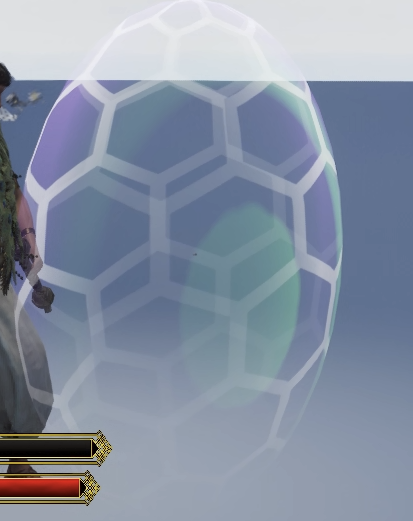
- Built a custom Unreal Engine material system, driven by projectile impact data.
- Impact position and timestamp are passed to the material to generate ripple effects at the correct point on the shield's surface.
- Ripple behaviour is fully parameterised, including: frequency, intensity, radius, colour, and lifetime.
- Ripple fade-out is implemented using an exponential falloff for smooth dissipation.
- Modular design so that (if necessary) multiple ripples could coexist simultaneously.
Amrita Area (AOE Ability)
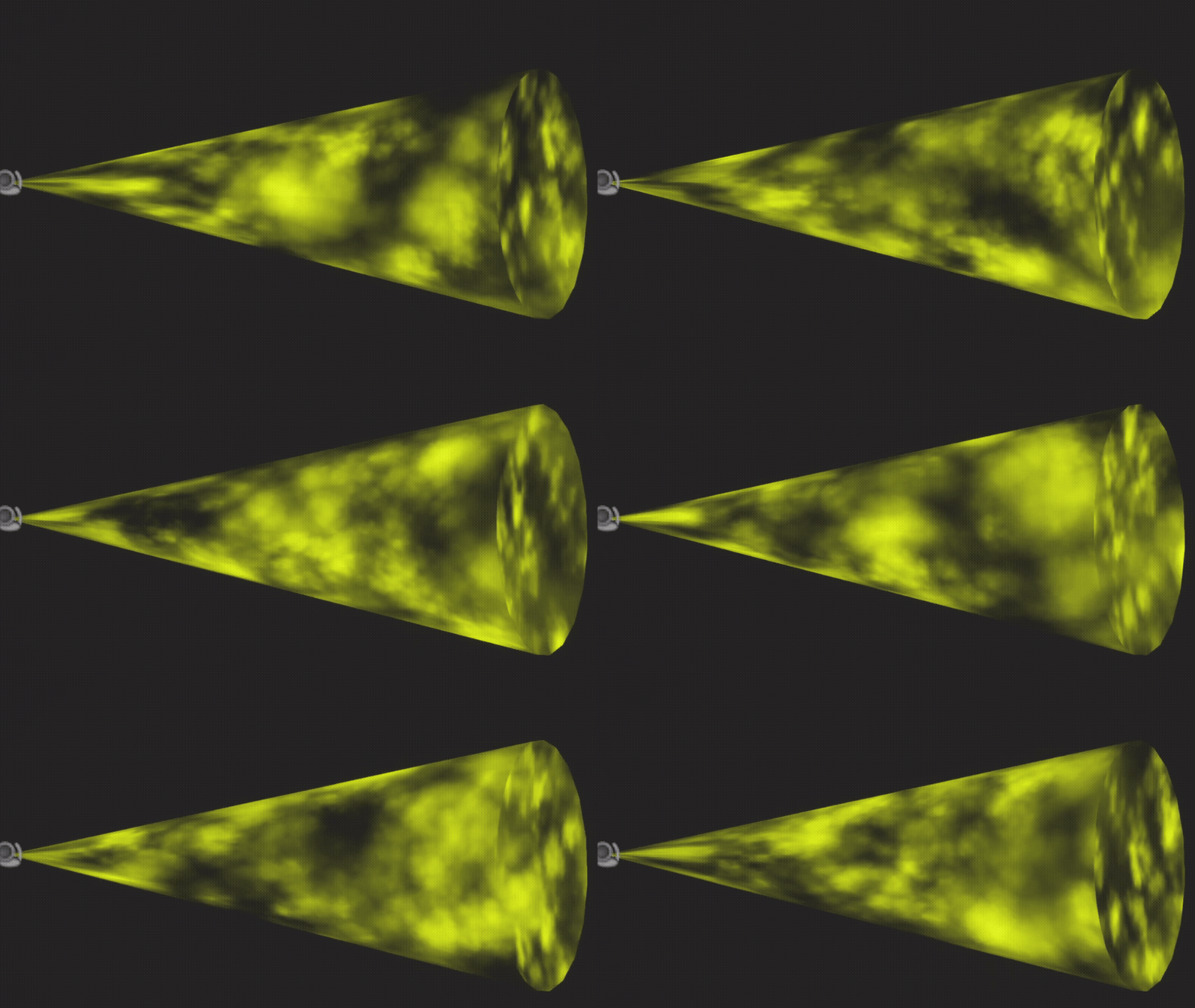
- Developed a cone-shaped area ability which can be triggered when shield charge is at or above 50% of its maximum charge.
- The specified amount of shield charge is consumed when the ability is used.
- Allies (including the player) within the area are healed, while enemies within the area are put into a stunned state.
- Stunned enemies are tracked internally to ensure they are only stunned once for each time they enter the area.
- Automatically destroys itself after a fixed duration.
- Includes a looping sound cue which plays while the area exists, and a sound which plays when the area dissipates.
Animations and Actions
- Implemented animation events for shield activation, impact reactions, and ability execution.
- Integrated Unreal Engine action system to ensure gameplay and animation synchronisation.
- Created a custom action for AOE ability, with a per-character adjustable translational offset.
- Integrated audio triggers directly into action pipeline to ensure consistency across the project.
Focus Depletion
- Implemented a continuous drain on the player's Focus points while the shield is raised.
- Drain occurs over time, instead of a one-off activation cost.
- Introduced the use_focus flag which can enable or disable the focus-related features easily.
- Displays a contextual UI warning when the shield cannot be raised because there isn't enough Focus.
- Balances defensive gameplay by forcing the player to perform resource management.
Chess Bevy
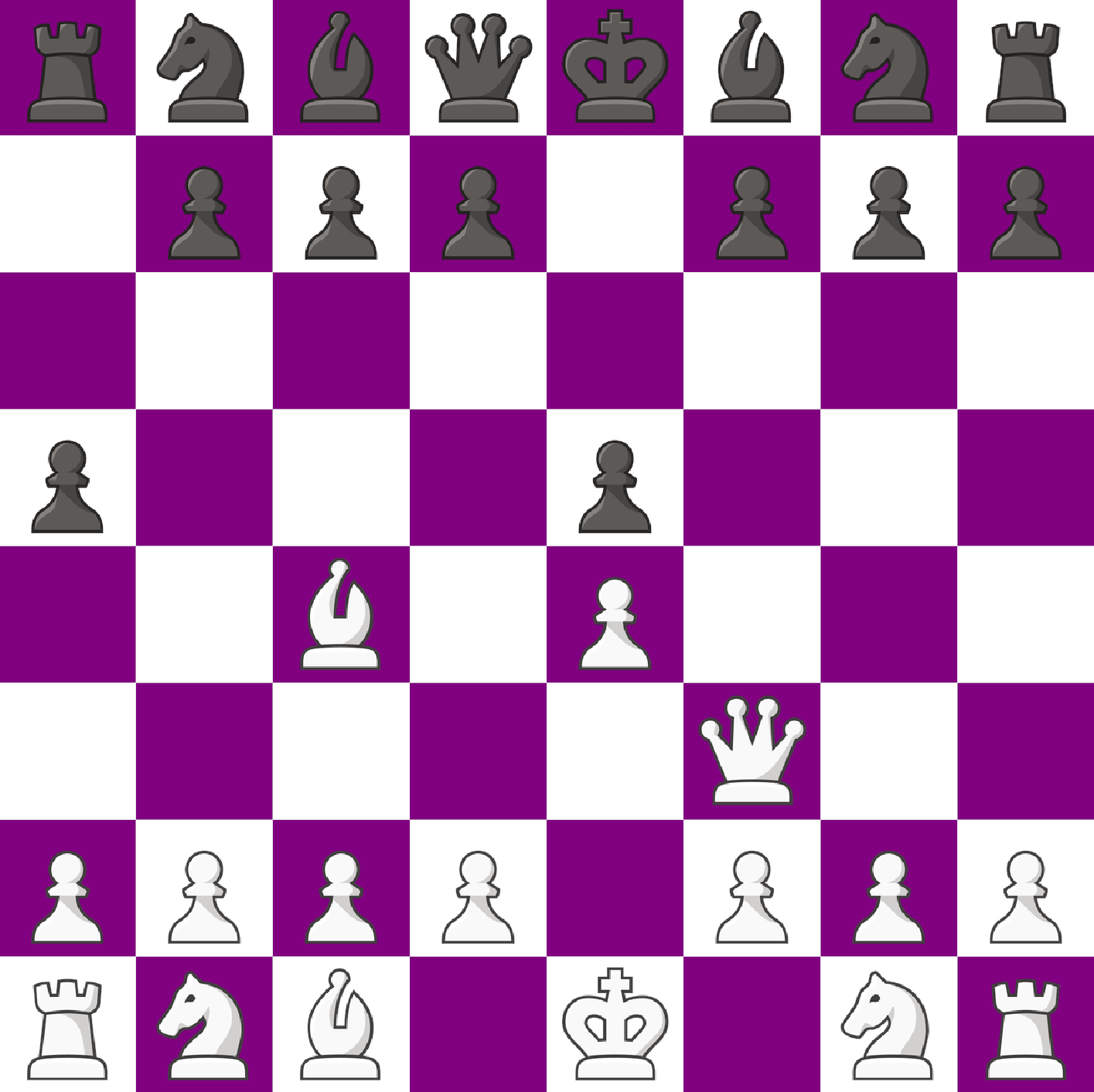
Chess GUI
Module Summary
- Built a desktop chess GUI using
Bevy. - Uses a custom chess engine library,
chess_core, based on bitboards for game logic and state management. - Designed as an interactive interface layer over a full rules-compliant chess core.
Technical Challenges
- Managing asynchronous communication with
Stockfishvia theUCIprotocol while keeping the GUI responsive. - Parsing and synchronising real-time engine evaluation updates without desynchronising game state.
- Mapping raw engine evaluation scores into meaningful move quality categories (Best Move → Blunder).
- Maintaining strict synchronisation between GUI state and
chess_coreto prevent board desyncs. - Handling complex chess rules (castling, en passant, promotion) without duplicating logic in the GUI layer.
- Preventing illegal user interactions while keeping the interface responsive.
- Ensuring legal-move highlighting stays consistent with engine-validated state per frame.
- Implementing undo/redo functionality with support for branching move paths.
- Preventing history corruption when users diverge from existing move timelines.
- Designing clear and non-intrusive visual feedback for moves and evaluations.
- Handling rapid user interactions (fast moves, undo spamming) without UI instability or flickering.
Engine Integration (UCI)
- Integrated
Stockfishvia theUCIprotocol for move analysis. - Retrieves best moves and evaluation scores after each player move.
- Uses engine output to classify player moves by quality (Best Move → Blunder).
- Drives an evaluation bar that updates after every move.
Gameplay / Rules Environment
- All moves are validated through the underlying chess engine (preventing illegal states in UI).
- Legal moves displayed when selecting a piece.
- Full Support for:
- Castling (with rights tracking).
- En passant captures.
- Move history consistency across special moves.
Move System
- Undo and redo functionality implemented via engine-backed move history.
- Maintains consistent board state across navigation.
- Tracks and restores full game state per move (including special rule state).
UI Features
- Highlights last move played on the board.
- Shows legal move indicators for selected pieces.
- Displays engine evaluation bar in real-time.
- Shows move classification (from engine evaluation) on the last moved piece.
Board Initialisation
- Board initialised using FEN strings.
- Debug overlays available:
- Bitboard visualisation (Per-piece-per-player).
- Attack square visualisation.
- En passant square state.
Current Limitations
- Pawn promotion partially implemented: only allows promotion to queen currently.
Chess Core
Module Summary
- Low-level chess engine library written in
Rust. - Designed for performance and future extensibility (e.g. full engine implementation).
- Uses bitboards as the primary representation for board state and move computation.
Technical Challenges
- Designing a full chess board representation using only
u64bitboards. - Encoding 12 piece sets efficiently while keeping operations cache-friendly.
- Balancing low-level bitwise control with maintainable abstractions.
- Structuring the library for future extensibility (e.g. full engine integration).
- Implementing move generation using bitwise operations instead of per-tile iteration.
- Ensuring deterministic and consistent move generation across all board states.
- Building a move history system which supports undo/redo as well as branching timelines.
- Ensuring full reproducibility of game state from historical position.
- Handling divergence logic without corrupting or duplicating history.
- Synchronising all state components (castling rights, en passant, counters) across history traversal.
Board Representation
- Board state represented using 12 bitboards (piece_type × player count).
- Each bitboard is stored as a
u64for compact and fast operations. - Supports fast bitwise operations for:
- Move generation.
- Occupancy checks.
- Path clearance validation.
- Central
Boardstruct maintains full game state:- Piece bitboards.
- En passant square.
- Castling rights per player.
- Active player.
- Half-move and full-move counters.
- Move history system.
Move Generation and State Logic
- Move validation built around bitboard operations rather than per-tile iteration.
- Efficient checks for legal movement using bit masking.
- Supports special rule handling (castling, en passant) at engine level.
- Ensures UI and engine remain synchronised through strict state control.
Move History System
- Implements full move history tracking with support for:
- Undo.
- Redo.
- Branching move paths.
- Key design features:
- Detects divergence from existing move timeline.
- Clears invalid future history when a new branch occurs.
- Maintains an index pointer into history for navigation.
- Each history entry stores:
- Move data.
- Captured piece (if any).
- En passant state at time of move.
- Castling rights snapshot.
- Ensures:
- Accurate rollback of full game state.
- Consistency of special rule state across history traversal.
Raymarch Bevy

A ray-marching renderer built in Rust using Bevy and WGSL shaders.
A custom fullscreen shader is used to replace the camera with an in-shader camera that performs ray marching to display the scene.
Integrated with eGUI to allow for real-time modification of parameters at runtime.
Project Summary
- Built a real-time ray-marched 3D scene renderer using a fullscreen shader pipeline in
Bevy. - Implemented responsive rendering that compensates for window rescaling to remove texture stretching.
- Created a fly camera system which pans via mouse input, translates based on keyboard inputs, and includes sprint controls for faster movement.
- Designed a modular shape system built using Signed Distance Functions, currently implemented for spheres, cubes, and planes.
- Added smooth unions or boolean blending for combining SDFs, with configurable blending constants.
- Implemented dynamic lighting, surface shading, and gamma correction in the fragment shader, consistent with the Phong shading model.
- Built a custom ray-march loop with collision detection, outlines for near-misses, and a gradient sky background.
- Structured shader data using Rust-side materials passed directly into
WGSLuniforms. - Included development-build
eGUItooling to modify in-game data in real-time.
Technical Challenges
- Balancing of ray-march step count against rendering performance.
- Maintaining visual quality while avoiding excessive shader calculations.
- Preventing stretched output across varying window aspect ratios.
- Ensuring stable camera controls with smooth rotation, while avoiding gimbal locking issues.
- Passing structured data from
Rustinto the shader efficiently using uniforms, including dynamic shape data arrays.
Rendering Pipeline
- A fullscreen quad rendered each frame.
- Fragment shader casts a ray from the camera for each pixel.
- Ray marches through the scene using Signed Distance Functions.
- Closest hit point is shaded using normals and lighting, near-misses are highlighted and become outlines.
Shader Camera
- Replaced the traditional in-engine camera with an in-shader camera.
- Calculated a ray direction, per-pixel, using screen-space coordinates and the calculated view frustum (based on camera parameters).
- Implemented free-fly movement with keyboard translation across forward, right, and up axes of the camera.
- Added mouse-look controls to rotate camera smoothly in real-time.
- Camera rotations are stored and modified as quaternions to avoid gimbal lock.
- Passed camera position, rotation, FOV, and basis vectors from
RustintoWGSLuniforms on each frame. - Included sprint movement for faster scene navigation (Controlled via
Shift ). - Integrated camera parameters with the
eGUIwindows to allow real-time modification while the scene is running.
Shape System
- Scene geometry represented using modular Signed Distance Functions primitives.
- Currently supports spheres, cubes, and planes.
- New shapes can be added by implementing additional SDF definitions.
- Each shape stores its position, scale, and colour, as well as its shape type (represented as an integer).
- Shapes can be blended using smooth unions or combined using boolean operations.
- Blending parameters are exposed at runtime and can be modified using the
eGUIwindows.
Lighting & Shading
- Surface normals are approximated from neighbouring SDF samples.
- Phong-style lighting model used for the diffuse and specular shading.
- Single dynamic light source with configurable position and colour.
- Gamma correction applied before final colour output for improved colour accuracy.
- Background rendered as a sky gradient when the ray didn't collide with any geometry.
- Silhouette outlines are generated from near-miss ray distances.
- Hard shadows are calculated to darken areas where the shapes block the light from the light source.
Future Improvements
- Portal rendering using non-linear ray traversal through SDF space.
- Soft shadows, and ambient occlusion to improve realism of the rendering.
- Multi-light support with extended material properties (roughness, emissiveness, etc).
- Adaptive ray-march step optimisation based on scene complexity.
- Additional SDF primitives: cylinders, capsules, and toruses.
Bar Daemon

Project Summary
- Built a system resource daemon in
RustusingTokio. - Uses
UnixStreamsockets for IPC between daemon and clients. - Push-based update system which broadcasts state changes to all listeners.
- Sends desktop notifications via
dunstifywhen resources change. - Default polling interval of 2.0s for resources that require polling.
Technical Challenges
- Designing a push-based system to eliminate client-side polling.
- Maintaining consistent state across multiple concurrent listeners.
- Balancing polling and event-driven updates across different resource types.
- Broadcasting full system state efficiently without excessive overhead.
- Ensuring reliable IPC communication using
UnixStreamsockets. - Separating data acquisition from transformation, for increased maintainability.
- Designing a modular system to support multiple interchangable data sources.
Daemon Architecture
- Central daemon handles all resource monitoring and state changes.
- Pushes full state as JSON to all connected listeners, triggered when any resource changes.
- Combines event-driven updates with interval-based polling.
- Listeners receive updates instantly without polling delays.
Command Line Interface
- Built using
Clapfor structured command parsing. - Supports commands:
daemon,listen,get, andset. - Full help support for all commands and subcommands.
- Provides aliases for faster command usage.
- Usage:
Command Description bar_daemon daemon- Runs the daemon.
- Only allows one daemon to be active on the socket at a time.
- Will respond to
get,set, andlistencommands. - Outputs errors and logs to a file.
bar_daemon listen- Listens for changes in resources.
- Receives JSON output of all resources when there's a change.
bar_daemon get [RESOURCE] [VALUE_TYPE]
bar_daemon get volume percent
bar_daemon get ram icon
bar_daemon get brightness- Gets the value of the
RESOURCE'sVALUE_TYPE. - Gets all values for the
RESOURCEif noVALUE_TYPEis supplied. - If no
RESOURCEis provided, gets all values for all resources.
bar_daemon set <RESOURCE> <VALUE_TYPE> <VALUE>
bar_daemon set volume percent -20
bar_daemon set fan profile next
bar_daemon set brightness monitor 50
- Sets the value of the requested
RESOURCE'sVALUE_TYPE. - For
brightnessandvolumedelta values can be provided:+10,-50. - For
brightnesspercentages are accepted:+50%.
Resource System
- All resources implement a shared
Monitoredtrait. - Polling behaviour defined via
Polledtrait. - Optional notification behaviour via
Notifytrait. - Supports interchangeable backends (e.g:
wpctl→pactl). - Separates logic into:
source.rs→ data acquisition.value.rs→ data processing and representation.
Monitored Resources
- Mix of event-driven and polled resources, depending on resource acquisition method.
- Supports multiple system resources:
Resource System Command Description Notifies Polled Volume wpctl- Monitors volume state.
- Controls volume state.
- Perceptual scaling applied.
Yes No Brightness brightnessctl- Uses hard-coded device IDs for now.
- Monitors display and keyboard brightness.
- Controls display and keyboard brightness.
Yes No Battery acpi- Polls battery state.
- Provides threshold-based notifications.
Yes Yes Bluetooth bluetooth
(bluetoothctl)- Monitors Bluetooth state.
- Controls Bluetooth state.
Yes No Fan Speed asusctl- Monitors fan profile.
- Controls fan profile.
Yes No Memory free- Polls system RAM usage.
No Yes
Data Flow
- Resource updates trigger full-state JSON broadcast.
- Listeners receive complete system snapshot on each update.
- Simplifies client logic by avoiding partial updates.
- Ensures all clients remain synchronised.
Volume Scaling (Perceptual Scaling)
- Implements perceptual (logarithmic) volume scaling.
- Fixes non-linear behaviour of
Pipewirevolume. - Uses square root mapping for consistent perceived increments.
- Maintains user-facing range of
[0-100].
Current Limitations
- Brightness device IDs are currently hardcoded.
- Full-state broadcasts may be inefficient for high-frequency updates.
Sound Themer
Project Summary
- Built a configurable CLI tool for playing themed system sounds based on keyword input.
- Decouples sound naming from file structure, enabling a single interface across multiple themes.
- Designed for integration with system notifications and automation workflows.
Technical Challenges
- Abstracting over inconsistent filesystem layouts across themes.
- Designing a flexible mapping system without ambiguity.
- Maintaining a simple CLI without compromising high configurability.
- Handling multiple file extensions and nested directories efficiently.
Core Design
- Keyword-driven playback system:
sound_themer play <KEYWORD>resolves to a mapped sound file.- Falls back to direct filename matching if no mapping exists.
- Theme Abstraction Layer:
- Each theme defines its own directory structure, file extensions, and naming scheme.
- Ensures consistent CLI usage across incompatible sound packs.
- Runtime Flexibility:
- Themes can be overridden via CLI flags without modifying the config.
Configuration System
- Uses
TOMLfor human-readable, extensible configuration. - Defines:
- Active theme.
- Theme directories and file extensions.
- Keyword → filename mappings.
- Supports:
- Nested directory structures.
- Non-uniform naming conventions across sound themes.
- Mapping system enables:
- Normalisation of inconsistent naming.
- Reuse of the same commands across all themes.
Command Line Interface
- Built using
Clapfor structured command parsing. - Supports:
- Subcommands with built-in help output.
- Command aliases (
play→p,list→ls).
- Example usage:
Command Description sound_themer play <SOUND_NAME>
sound_themer p <SOUND_NAME>- Plays a sound from the theme folder.
- Maps from
SOUND_NAMEto its associated value in the selected theme (if one exists).
sound_themer list
sound_themer ls- Lists the sound files in the currently selected theme's folder.
sound_themer --theme <THEME_NAME> <COMMAND>
sound_themer -t <THEME_NAME> <COMMAND>
- Overrides the theme which is selected in
config.toml.
Extensibility
- New themes can be added without making code changes.
- Configuration-driven design supports:
- Custom keyword dictionaries.
- Arbitrary directory layouts.
- Additional sound formats.
- Suitable for integration with:
- Window managers.
- Notification systems.
- Automation scripts.
Example Config
# Name of the selected sound theme
theme_name = "freedesktop"

[[themes]]
# Name of the sound theme folder
name = "freedesktop"

# Extension on the sound files
sound_ext = "oga"

# Directories where the sounds are found
directories = ["stereo"]

# Provide a mapping between certain phrases and their respective sound file name
mapping = {
  audio-change = "audio-volume-change",
  login = "service-login",
  logout = "service-logout",
  message = "message",
  power-plug = "power-plug",
  power-unplug = "power-unplug",
  dialog-info = "dialog-information",
  dialog-warning = "dialog-warning",
  dialog-error = "dialog-error",
  screen-capture = "screen-capture",
  device-added = "device-added",
  device-removed = "device-removed",
  camera-shutter = "camera-shutter",
  trash-empty = "trash-empty",
  complete = "complete"
}
Dotfile Templater
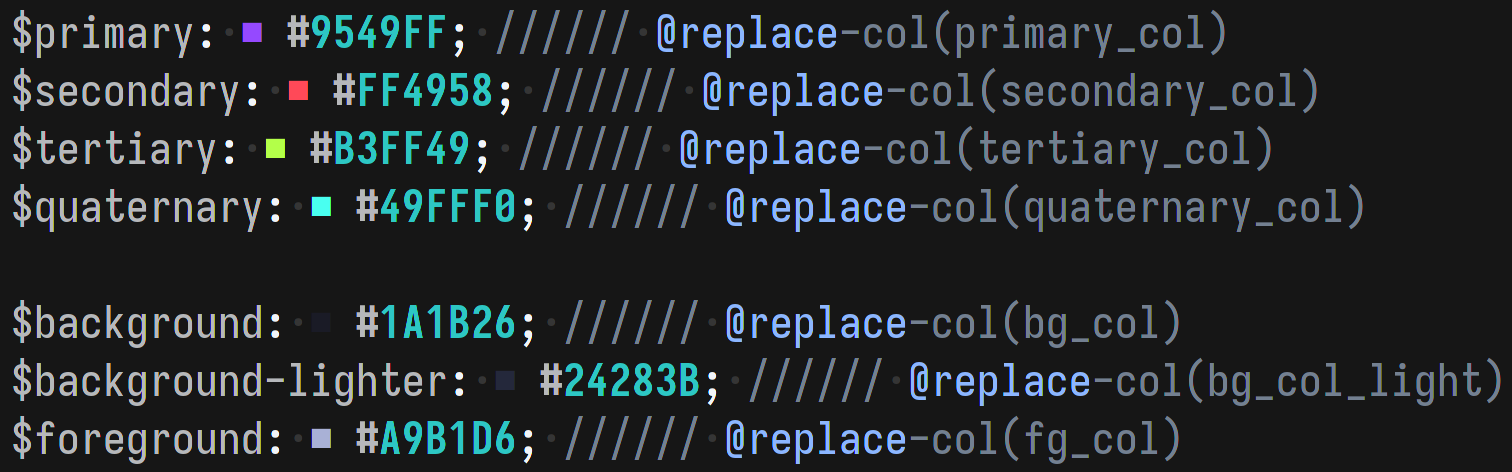
Project Summary
- Built a lightweight templating tool in
Rustfor modifying configuration files in-place. - Implements a minimal inline templating language embedded within comments.
- Designed for dotfile theming and automation, enabling dynamic config updates without separate template files.
Technical Challenges
- Designing a minimal templating language that works within existing config syntax.
- Parsing inline comment-based instructions without interfering with file semantics.
- Ensuring safe, deterministic replacements using a fixed-length constraint.
- Managing multiple sequential transformations on a single line.
- Supporting flexible file formats with different comment styles.
Core Design
- Inline templating system:
- Template logic is written inside comments on the same line as the target config.
- Avoids separate template files, keeping configuration self-contained.
- Marker-Based Parsing:
- Each file defines a
marker_char(e.g://,;,%). - Template code is detected when the marker is repeated
marker_repetition_numtimes.
- Each file defines a
- Pattern-Based Replacement:
- Uses
Regexpatterns to locate target text. - Replaces matched segments with values defined in config (
keyword).
- Uses
Safety Model
- Enforces fixed-length replacements:
- Replacement text must match the length of the original.
- Prevents unintended shifts in file structure or formatting.
- Deterministic matching:
- Each function operates on a specific match index.
- Multiple functions on a line act on successive matches (
nth match based on their order).
Templating System
- Keyword-driven replacement:
- A
keywordmaps to a value defined in theTOMLconfig. - Used to replace matched patterns in config files.
- A
- Execution Model:
- Functions are parsed left-to-right on a line.
- Each function targets a specific match within the line.
Supported Functions
| Function | Arguments | Description |
|---|---|---|
@replace |
keyword pattern |
Replace first text which matches pattern with the keyword. |
@replace‑col |
keyword |
Replace first text which matches #[A‑Za‑z\d]{6} with the keyword. |
@replace‑pattern |
pattern_1 keyword pattern_2 |
Find first text which matches pattern_1, then find first match within this match based on pattern_2 and replace that with the keyword. |
@replace‑pattern‑col |
keyword pattern_2 |
Find first text which matches #[A‑Za‑z\d]{6}, then find first match within this match based on pattern_2 and replace that with the keyword. |
Configuration System
- Uses
TOMLfor configuration. - Located at
$XDG_CONFIG_HOME/dotfile-templater/config.toml. - Defines:
- Active theme.
- Marker behaviour (
marker_char,marker_repetition_num). - Target files and their parsing rules.
- File configuration:
- Supports relative paths (from
.config/) and absolute paths. - Each file must define its own
marker_char.
- Supports relative paths (from
Example Config
theme = "purple-night"
marker_repetition_num = 3
files = [
  {file = "eww/eww.scss", marker_char = "//"},
  {file = "eww/bar/bar.yuck", marker_char = ";"},
  {file = "wofi/style.css", marker_char = ";"},
  {file = "hypr/hyprland.conf", marker_char = "%"},
]

[[themes]]
name = "purple-night"

primary_col = "#9549FF"
secondary_col = "#FF4958"
tertiary_col = "#B3FF49"
quaternary_col = "#49FFF0"

bg_col = "#1A1B26"
bg_col_light = "#24283B"
fg_col = "#A9B1D6"

[[themes]]
name = "blue-banana"

primary_col = "#48FFD1"
secondary_col = "#4876FF"
tertiary_col = "#FF4876"
quaternary_col = "#FFD148"

bg_col = "#0A0A40"
bg_col_light = "#11116C"
fg_col = "#9999F8"
Theme System
- Themes are defined as named sections in the config.
- Each theme:
- Must include a
name. - Can define arbitrary variables (e.g: colours, strings).
- Must include a
- Enables:
- Centralised value management.
- Easy switching between configurations (e.g: colour schemes).
Example Usage
test = This will not be configured % Even if there are comments

$primary: rgb(9549FF); %%% @replace-pattern('rgb\([A-Za-z\d]{6}\)', primary_col, '[A-Za-z\d]{6}')
$secondary: #FF4958; %%% @replace-pattern-col(secondary_col, '[A-Za-z\d]{6}')
$tertiary: #B3FF49; #123456; %%% @replace-col(fg_col) @replace-col(bg_col)
$quaternary: #49FFF0; %%% @replace-col(quaternary_col)

$background: #1A1B26; %%% @replace-col(bg_col)
$background-lighter: #24283B; %%% @replace-col(bg_col_light)
$foreground: #A9B1D6; %%% @replace-col(fg_col)
Extensibility
- New template functions can be added without changing file format.
- Supports:
- Arbitrary regex-based transformations.
- Custom themes with user-defined variables.
- Multiple file types with different comment syntaxes.
- Suitable for:
- Dotfile management.
- Theming systems.
- Automated config generation.
Current Limitations
- Fixed-length replacement constraint limits flexibility.
- Regex-based approach may be brittle for complex syntax.
- No validation for malformed template expressions.
- Limited error feedback for failed matches or replacements.